Diploma in Computer Applications (DCA)
The Diploma in Computer Applications (DCA) provides practical training in computer fundamentals and Microsoft Office applications. It helps learners develop office automation, internet, and digital communication skills for academic and workplace use. The fee structure includes administration, examination, certificate, postal, and verification charges.
This course introduces learners to the fundamentals of computers, operating systems, Microsoft Office applications, internet concepts, digital communication, and basic computer operations. The curriculum is structured to enhance practical computer skills through hands-on exercises, assignments, projects, and assessments.
The programme is offered in an online self-paced learning mode, enabling learners to study according to their convenience from anywhere and at any time. The course combines video lectures, practical demonstrations, quizzes, assignments, and final examinations to ensure effective learning outcomes.
The DCA programme is suitable for students, job seekers, office staff, entrepreneurs, and individuals seeking to improve their computer literacy and workplace productivity skills.
Upon successful completion of the programme and assessments, learners will receive the Diploma in Computer Applications (DCA) issued by SKRGC Academy.
Course Fee Structure
The Certificate in Diploma in Computer Applications (DCA) is designed to provide practical knowledge and hands-on training in Microsoft Office tools commonly used in academic and professional environments. The fee structure given below includes administration charges, examination and certificate postal fees, along with transcript and genuineness verification charges.
| S.No | Course Title | Duration | Admin Fees | Examination & Certificate Postal Fee | Transcript & Genuineness Test Charge |
|---|---|---|---|---|---|
| 01 | Certificate in MS Office Applications | 1.5 Months | ₹1500 | ₹800 | ₹200 |
| - | - | - | - | Total | ₹2500 |
Course Objectives
- To provide fundamental knowledge of computer systems and applications
- To develop office automation and productivity skills
- To train learners in MS Office applications
- To introduce internet technologies and digital communication
- To enhance practical computer handling abilities
- To prepare learners for academic and workplace computer usage
Learning Outcomes
After completing this course, learners will be able to:
- Understand computer fundamentals and operating systems
- Create professional documents using MS Word
- Perform spreadsheet calculations using MS Excel
- Develop presentations using MS PowerPoint
- Use internet and email communication effectively
- Manage files, folders, and digital resources efficiently
- Apply computer applications in academic and professional environments
Eligibility
- School Students
- College Students
- Job Seekers
- Working Professionals
- Beginners interested in computer applications
Course Features
- Online Self-Paced Learning
- Beginner Friendly Curriculum
- Practical-Based Training
- Video Lectures and Demonstrations
- Assignments and Assessments
- Digital Learning Resources
- Certificate/Diploma upon Completion
| Course Title | Diploma in Computer Applications | ||||||||||||||||
| Duration | 6 Months | ||||||||||||||||
| Credits | 12 Credits | ||||||||||||||||
| Language | English | ||||||||||||||||
| Course Level | Foundation | ||||||||||||||||
| Category | Computer Applications | ||||||||||||||||
| Learning Hours | 180 Hours | ||||||||||||||||
| Mode | Online Self-Paced | ||||||||||||||||
| Assessment | Quiz + Practical + Final Examination | ||||||||||||||||
|
|||||||||||||||||
First Semester
| S.No | Subject Code | Subject Title | Study Materials | Watch Lessons |
|---|---|---|---|---|
| 1 | DCA101 | Fundamentals of Computers and Operating Systems | Download PDF | Watch All Lessons |
| 2 | DCA102 | MS Word Applications and Document Processing | Download PDF | |
| 3 | DCA103 | MS Excel Applications and Spreadsheet Management | Download PDF | |
| 4 | DCA104 | Internet Applications and Digital Communication | Download PDF | |
| 5 | DCA105P | Practical – I | Download PDF | |
| 6 | DCA106P | Practical – II | Download PDF |
Second Semester
| S.No | Subject Code | Subject Title | Study Materials | Watch Lessons |
|---|---|---|---|---|
| 1 | DCA201 | MS PowerPoint Applications and Presentation Skills | Download PDF | Watch All Lessons |
| 2 | DCA202 | File Management and Office Productivity Tools | Download PDF | |
| 3 | DCA203 | Introduction to Database Concepts and Computer Security | Download PDF | |
| 4 | DCA204 | Digital Skills, Cloud Computing, and Online Collaboration | Download PDF | |
| 5 | DCA205P | Practical – III | Download PDF | |
| 6 | DCA206PR | Project and Viva Voce | Download PDF |

Books
1. https://www.rcsaindia.org/book/RCSAINDIA-DCA%20COURSE%20COMPLET%20BOOK.pdf
2. https://osou.ac.in/eresources/osou-dca-01-computer-fundamentals.pdf
3. https://www.aksuniversity.ac.in/Syllabus/Computer/DCA_2022.pdf
References
1. https://www.youtube.com/watch?v=ONq4yR_oTn8&list=PLHExCPhHIY8FmbXEVuY4NzkxIOe9nsxZq
2. https://www.youtube.com/watch?v=8kJAXH-VoLI&list=PL1dx_7g6scPKoIHceHH_LHfjB4RxOUurp
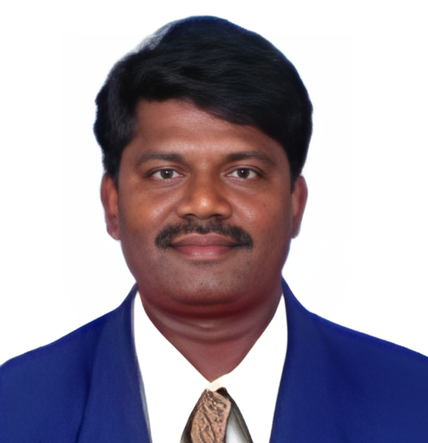
Dr.B.Balakumar,
Assistant Professor (Grade III),
Centre for Information Technology and Engineering,
Manonmaniam Sundaranar University,
Tirunelveli, Tamil Nadu, India.
Dr.B.Balakumar holds a B.Tech in ECE from NIT Hamirpur (2003) and an M.Tech in Computer and IT from MS University (2006). He earned his Ph.D. in Medical Image Processing from Manonmaniam Sundaranar University in 2019. Currently, he serves as an Assistant Professor (Grade III) at the Centre for IT & Engineering, MS University, Tirunelveli. He has published extensively in International Journals and Conferences. He is a reviewer and regional editor for reputed international journals. He is affiliated with BMC, SAGE, and the Journal of the National Cancer Institute. His research interests include Image Processing, Cloud Computing, Cyber Security, and Data Science. He actively supervises Ph.D. scholars in diverse computing and data-driven fields. He is a Life Member of Professional Bodies such as ISTE and CSI. With a passion for Innovation, he contributes significantly to both Academia and Applied Research
Batch Certificate List
View the batch-wise certificate details including Roll Number, Candidate Name and Subject Code of enrolled learners.